Skip to content

Examples

The MicroPythonMCU.Examples package holds 52 ready-to-simulate models: open the model, simulate, plot the listed variables. Each one runs the program named in the "Program" column, to be read alongside: in Resources/Scripts/MCU/, or in Resources/Verification/ for those marked (V). The examples also serve as scenarios for the library's verification suite. Program comments and printed messages are in French.

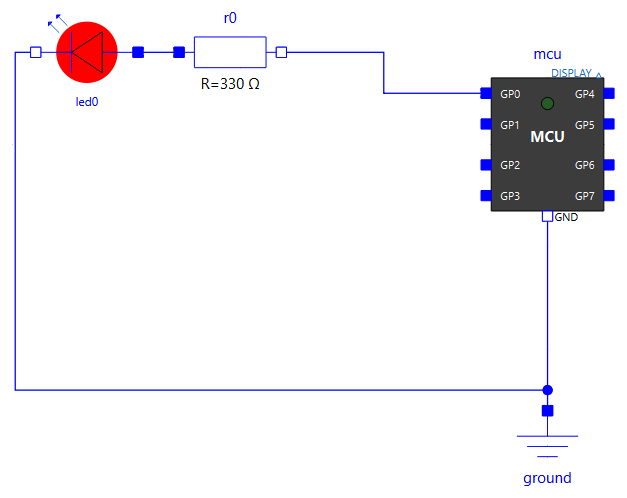
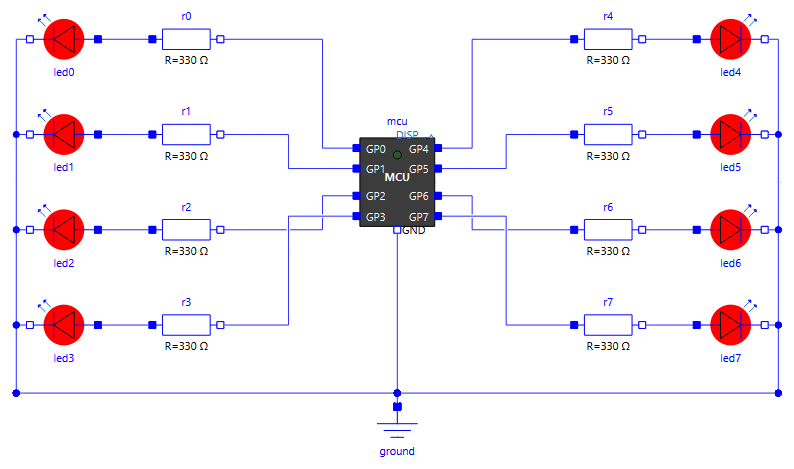
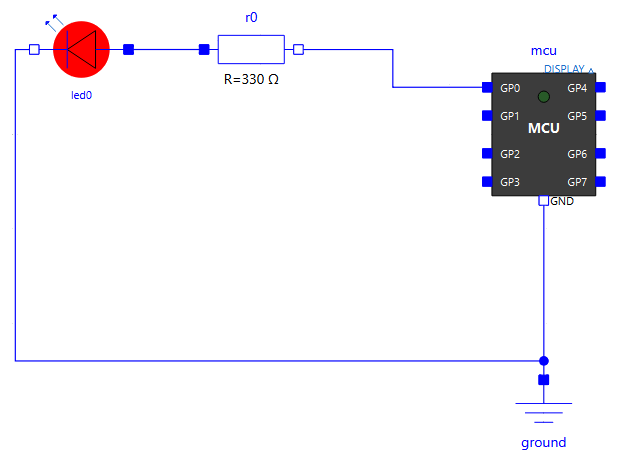
BasicBlink Gpio.LedChaser Pwm.LedFade
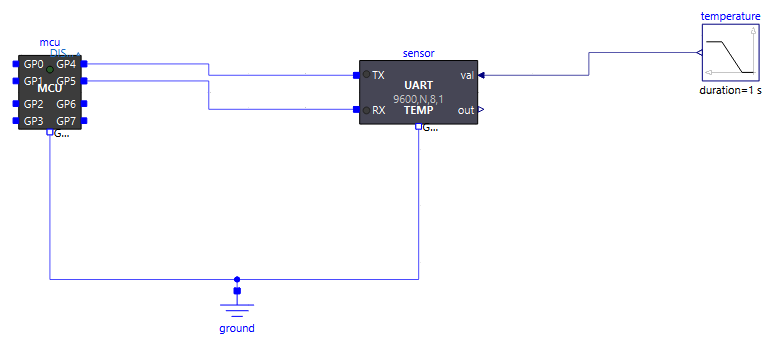
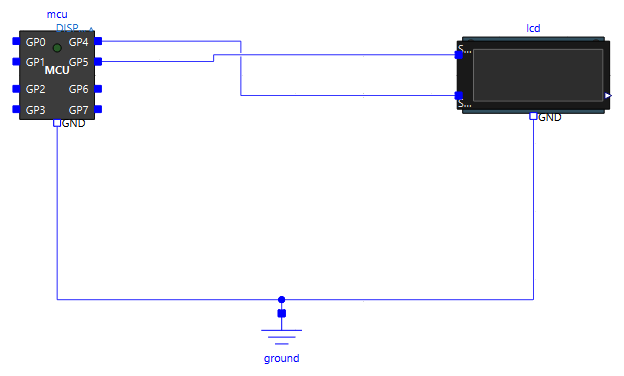
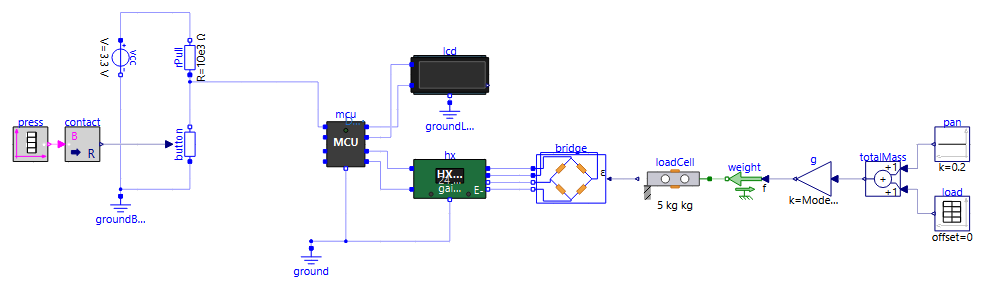
Uart.Sensor I2c.GroveLcd Weighing.KitchenScale

Getting started

Example What it shows What to watch Program
BasicBlink The default program: GP0 and the on-board LED blink at 0.5 Hz mcu.GP0.v, LED icons demo.py

Digital pins (Examples.Gpio)

Example What it shows What to watch Program
Gpio.LedChaser Chaser on 8 LEDs placed around the microcontroller LED icons (animated replay) led_chaser.py
Gpio.PinEcho GP1 toggles, GP2 reads back its electrical state, GP3 copies it mcu.GP1.v, mcu.GP3.v pin_echo.py
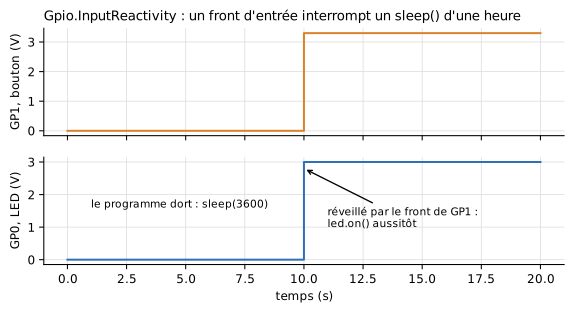
Gpio.InputReactivity A button on GP1 wakes the program during a sleep(3600) mcu.GP1.v, program output input_reactive.py (V)
Gpio.Timing Cost of a pin access (gpioOpTime): on()/off() pulse without sleep, burst, busy-wait, masked IRQ mcu.GP0.v (zoom to the µs) gpio_timing.py (V)
Gpio.Pull Internal pull resistors: two buttons without any external resistor (Pin.PULL_UP to ground, Pin.PULL_DOWN to 3.3 V), and a pin whose pull changes against a 1 MΩ external resistor mcu.GP0.v, mcu.GP3.v, mcu.GP4.v gpio_pull.py

Woken up by an input during a sleep

Gpio.InputReactivity: an input edge interrupts a one-hour sleep(). Figure labels are in French: « bouton » = button, « le programme dort » = the program sleeps, « réveillé par le front de GP1 : led.on() aussitôt » = woken up by the edge of GP1: led.on() at once.

Analog inputs (Examples.Adc)

Example What it shows What to watch Program
Adc.Read GP1 as an analog input on a voltage divider (≈ 2.2 V); threshold copied to an LED mcu.GP1.v, mcu.GP0.v adc_read.py
Adc.Sleep An analog input crossing the logic threshold does not wake the program mcu.GP0.v, mcu.GP1.v adc_sleep.py

PWM (Examples.Pwm)

Example What it shows What to watch Program
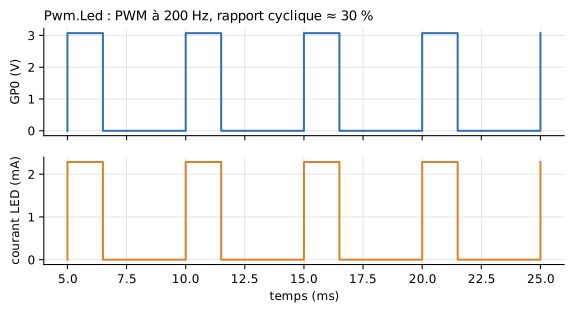
Pwm.Led 200 Hz PWM, duty cycle ≈ 30 % mcu.GP0.v, led0.p.i pwm_led.py
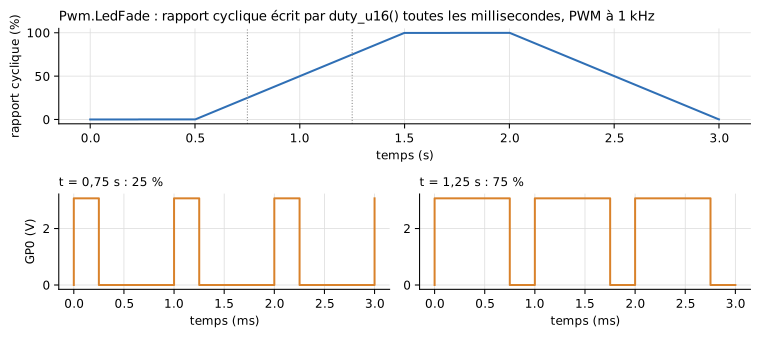
Pwm.LedFade Gradual change of the duty cycle: the LED fades in LED icon, led0.p.i pwm_led_fade.py

200 Hz PWM

Figure labels are in French: « temps » = time, « courant LED » = LED current, « rapport cyclique » = duty cycle.

LED fade: duty cycle and PWM signal

Pwm.LedFade: duty cycle written by duty_u16() every millisecond (top), and the 1 kHz PWM signal at 25 % and 75 % (bottom). Figure labels are in French: « rapport cyclique » = duty cycle, « temps » = time.

Interrupts and timers (Examples.Irq)

Example What it shows What to watch Program
Irq.Pin Pin.irq() on rising edges only: the LED toggles on each rising edge of the square wave mcu.GP1.v, mcu.GP0.v pin_irq_demo.py (V)
Irq.Timer A 500 ms periodic Timer toggles an LED while the program sleeps mcu.GP0.v timer_toggle.py (V)

Program execution (Examples.Program)

Example What it shows What to watch Program
Program.SleepCompression Two sleep(3600) simulated in a fraction of a second of computation simulation duration sleep_long.py (V)
Program.Error An uncaught exception stops the simulation, Python traceback in the log log script_error.py (V)
Program.Imports Import of a module placed next to the program and of a library from another folder (libraryPath) LEDs on GP0 and GP1 import_demo.py
Program.Debug Step-by-step debugging with VS Code: the simulation waits until VS Code attaches, simulated time frozen during pauses (see Debugging with VS Code) VS Code, LEDs on GP0 and GP1, log debug_demo.py

File system (Examples.FileSystem)

Example What it shows What to watch Program
FileSystem.Boot No script: boot.py then main.py of a flash image; ADC readings logged to /data/measurements.csv copy folder (opened at the end of the simulation) datalogger/ image
FileSystem.Script boot.py from the flash, then an external program instead of main.py log, written files fs_script.py

Teaching display (Examples.Display)

Example What it shows What to watch Program
Display.Demo Two messages sent to a Peripherals.Display; the first one moves down to line 2 display icon, log display_demo.py
Display.Large Ten messages received at once by a 20x2 Display and by the large screens Display4x32 and Display8x32, which fill line after line, then scroll icons of the three displays (animated replay) display_large.py
Example What it shows What to watch Program
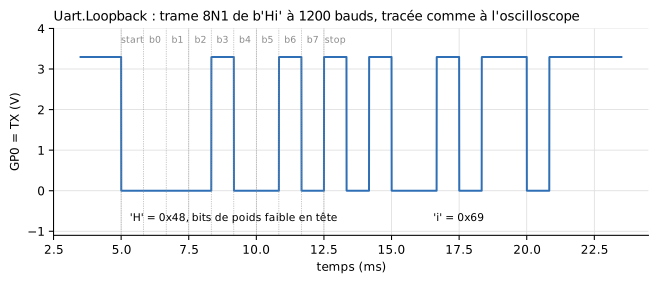
Uart.Loopback 8N1 frame looped back onto the microcontroller mcu.GP0.v uart_loopback.py
Uart.EchoPy Dialogue with an echo device described by a Python script mcu.GP5.v, mcu.GP4.v, log uart_echo.py
Uart.Echo Same setup, echo set in the device's table same uart_echo.py
Uart.Sensor Querying a temperature sensor, then sending a setpoint sensor.valueOut[1], log uart_sensor.py
Uart.Regulation Closed-loop control through the serial link alone plant.y, sensor.valueOut[1] uart_regulation.py
Uart.GpsPy A GPS module sends its frames without being asked log uart_gps.py
Uart.StateMachinePy Device whose reply depends on its history (Python state machine) log uart_state_machine.py
Uart.Lcd Two lines written to a 20x2 serial display display icon uart_lcd.py
Uart.Format 8E2 link (even parity, 2 stop bits) with an echo device set the same way mcu.GP5.v, mcu.GP7.v uart_format.py
Uart.FormatMismatch Same circuit, device in odd parity: bytes kept, parity errors in the log log uart_format.py

Serial frame

I2C bus (Examples.I2c)

Example What it shows What to watch Program
I2c.Echo Writing and reading back a frame, reading a register after a repeated START echo.SDA.v, echo.SCL.v i2c_echo.py
I2c.MultiDevice Three devices on a 400 kHz bus, found by scan() log i2c_multi.py
I2c.NoPullUp Bus without external pull-up resistors: the internal pull-ups alone (50 kΩ) are too slow at 400 kHz, OSError(ETIMEDOUT) slow rising edges, log i2c_nopullup.py
I2c.GroveLcd Grove LCD RGB display driven by an unmodified off-the-shelf driver display icon i2c_grove_lcd_rgb.py

Several microcontrollers (Examples.MultiMcu)

Several MCU blocks in the same model, each with its own program (see Several microcontrollers).

Example What it shows What to watch Program
MultiMcu.Independent Two boards run the same program and import the same module: each keeps its own state mcu1.GP1.v, mcu2.GP1.v, prefixed log multi_counter.py
MultiMcu.Handshake REQ/ACK handshake over two wires, B answers from a Pin.irq mcuA.GP0.v, mcuB.GP1.v handshake_a.py, handshake_b.py
MultiMcu.Uart Crossed serial link: A sends PING, B answers PONG mcuA.GP0.v, mcuB.GP0.v, log uart_ping.py, uart_pong.py
MultiMcu.FileSystem Two data loggers start from the same flash image: one copy each folders mcu1_datalogger_*, mcu2_datalogger_* boot.py/main.py of datalogger
MultiMcu.I2c I2C bus between two boards, B is a target in memory mode (I2CTarget(mem=...)) mcuA.GP5.v, LED of B, log i2c_controller.py, i2c_target_mem.py
MultiMcu.I2cIrq Same bus, B answers commands from an I2CTarget.irq() handler log i2c_controller_irq.py, i2c_target_irq.py

Weighing (Examples.Weighing)

Example What it shows What to watch Program
Weighing.Hx711Read Reading an HX711 with robert-hh's driver: gain 128, gain 64, power-down and wake-up hx.code, hx.PD_SCK.v, hx.DOUT.v, display hx711_read.py

Transparent radio modules between the UARTs of two microcontrollers, joined by a single antenna wire (Radio link).

Example What it shows What to watch Program
Radio.Link The PING/PONG programs of MultiMcu.Uart, unchanged, through two radio modules mcuA.GP0.v, radioA.carrierOn, mcuB.GP1.v, radioA.sTx (FSK carrier, output every 2 µs), summary of each module in the log uart_ping.py, uart_pong.py
Radio.Overflow 40 bytes at 9600 baud, transmitted again at 1200 bit/s with a 16-byte buffer: the end of the message is lost radioA.txFill, radioA.nDropped, what B prints radio_burst.py, radio_listen.py
Radio.Modulations The character U in OOK, ASK, FSK and BPSK txOOK.sTx, txASK.sTx, txFSK.sTx, txBPSK.sTx between 25 and 35 ms radio_beacon.py
Weighing.KitchenScale Complete kitchen scale, TARE button display icon kitchen_scale.py

Raspberry Pi Pico board (Examples.Pico)

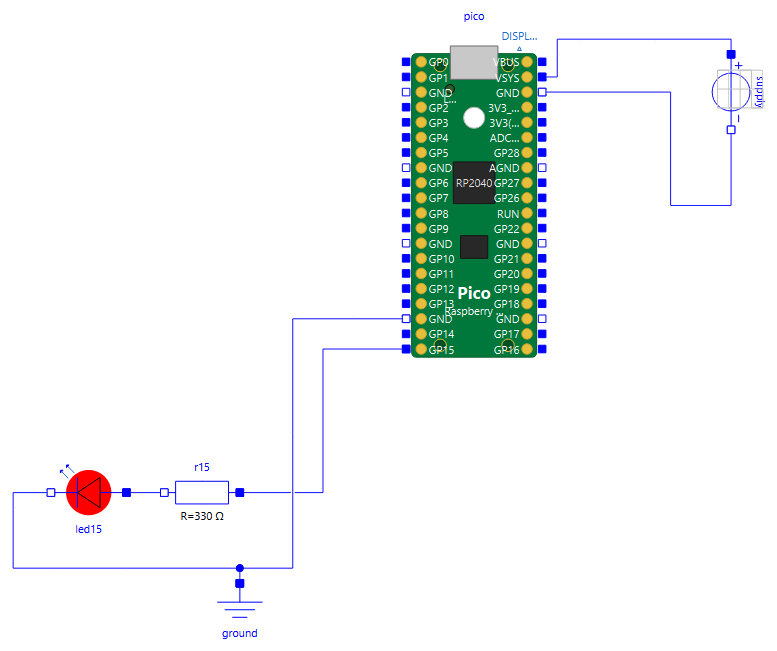
The replica of the board and its power supply (see The Raspberry Pi Pico board).

Pico.Blink Pico.Battery Pico.PowerUp
Example What it shows What to watch Program
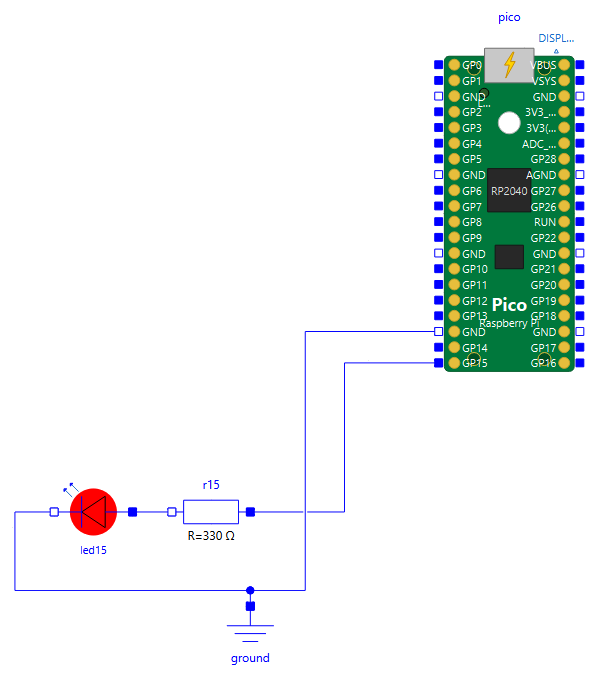
Pico.Blink Board supplied by USB, nothing to wire: on-board LED and LED on GP15, VSYS and temperature read by ADC(3) and ADC(4) pico.GP15.v, pico.vSys, pico.iSys, log pico_blink.py
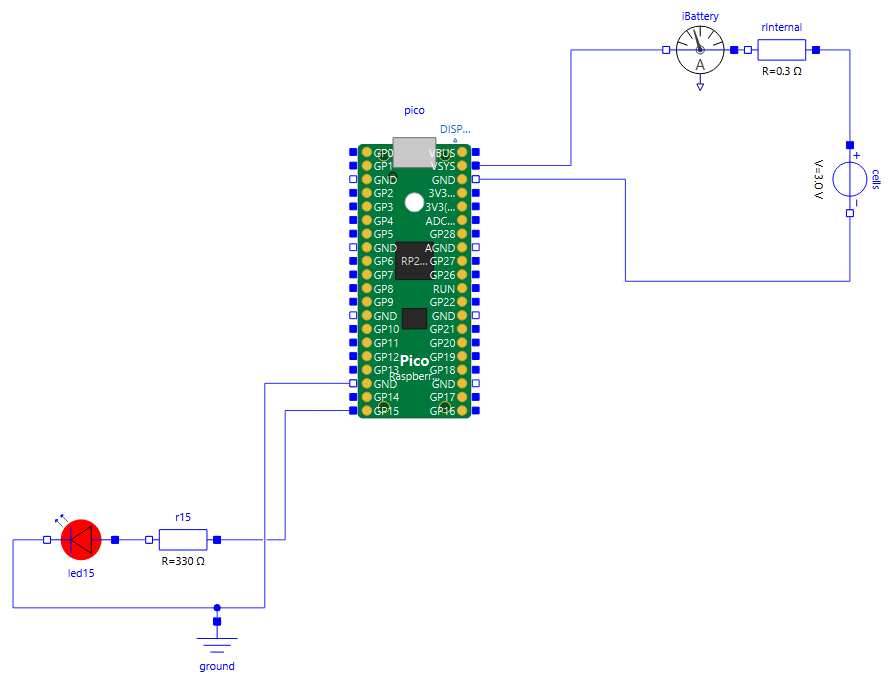
Pico.Battery Same program on two AA cells connected to VSYS: current drawn from the cells, higher while the LEDs are lit iBattery.i, pico.vRail pico_blink.py
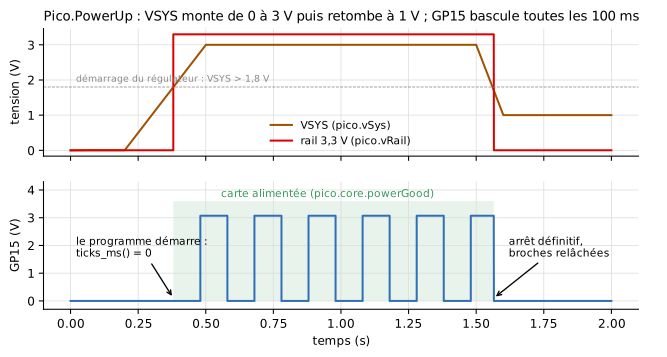
Pico.PowerUp Ramp on VSYS: the program starts at power-on (ticks_ms() = 0), then stops when VSYS falls pico.vRail, pico.core.powerGood, pico.GP15.v, log pico_power.py

Pico.PowerUp: VSYS and 3.3 V rail, GP15; the program starts at 0.38 s and stops at 1.565 s

Labels in French: "tension" = voltage, "carte alimentée" = board supplied, "le programme démarre" = the program starts, "arrêt définitif, broches relâchées" = stopped for good, pins released, "temps" = time.

Logic analyser (Examples.Analyzer)

The LogicAnalyzer probe decodes the wires of a circuit into a text file, opened in Notepad at the end of the simulation, and records them in a VCD file for PulseView (Logic analyser).

Example What it shows What to watch Program
Analyzer.UartLink Probe on both wires of the 8E2 link of Uart.Format, channels of kind Uart UartLink.analyzer.txt: "Hello, parity!" in hex + ASCII, bits and bytes under the timing diagram; the echo overlaps the message uart_format.py
Analyzer.UartErrors Same probe, device in odd parity (Uart.FormatMismatch) bytes sent back marked ! and !P uart_format.py
Analyzer.I2cBus Probe on the bus of I2c.Echo: SCL as Logic, SDA as I2cSda one line per transaction, NACK ending a read, repeated START i2c_echo.py
Analyzer.Hx711Serial Probe on the PD_SCK/DOUT link of Weighing.Hx711Read, DOUT as SyncData (24 bits, MSB first) one word per conversion, gain pulses, compressed silences hx711_read.py